LexaSecurity document exchange
Pre-launch · For compliance teams

Stop resending your security documents.

Publish your SOC 1, SOC 2, pen tests and completed questionnaires on one trust page. Grant requesters access instead of emailing files. Upload a renewed report once, and everyone with active access can view it.

First 100 companies
Free through early access. The first 100 companies on the waitlist lock launch pricing for their first year.
SOC 2 Type II · grants3 with access
Renewed report uploaded · 14 Mar
Everyone with active access can view the new report.
Northwind Health
Granted 12 Mar
Access active
Halvorsen Bank
Granted 3 Jun
Access active
Tessellate Ltd
Granted 28 Aug
Access active
Access, not attachments

From sending files to granting access.

Lexa moves documents between companies. It doesn't score them, tier them or fill in questionnaires. You grant permission to view a document instead of emailing an attachment. When you upload a renewed version, anyone with active access can view it.

Sending files
How you share
Attach. Send. Send again.
When you upload your renewed SOC 2
Email everyone who has the old one
Who has what
A sent folder
Your vendors' documents
Same inbox, other direction
Granting access
How you share
Grant access to the document
When you upload your renewed SOC 2
Everyone with active access can view it
Who has what
Every grant, on the record
Your vendors' documents
If the vendor publishes through Lexa, you get access the same way
01
Publish

Your SOC 1, SOC 2, pen tests, completed questionnaires and DPA live on one trust page, gated by the rules you set.

02
Grant

A request comes in, routed to the right owner with a deadline. You grant access — or your rules do. Nothing is attached to an email.

03
Update

Upload the renewed SOC 2. Everyone with active access can view the new report without another attachment.

A week in compliance

Security documents are still sent by hand. You already know how the week goes.

Monday
A prospect asks for your SOC 2.
You find the PDF, check it's the current one, and email it.
Wednesday
A customer's auditor asks for the same one.
Same PDF, new thread. Sales pings you twice to ask if it went out.
Friday
Legal asks who has the pen test.
You check the email threads and agreement records to confirm who received it.
Next year
The report renews.
The companies you emailed still have the previous report. You check who needs the new one and send it again.
Inside Lexa

Less time forwarding. More time on the work that needs you.

Built for the compliance team that handles document requests. One queue shows each request's owner and waiting time, with a record of access granted.

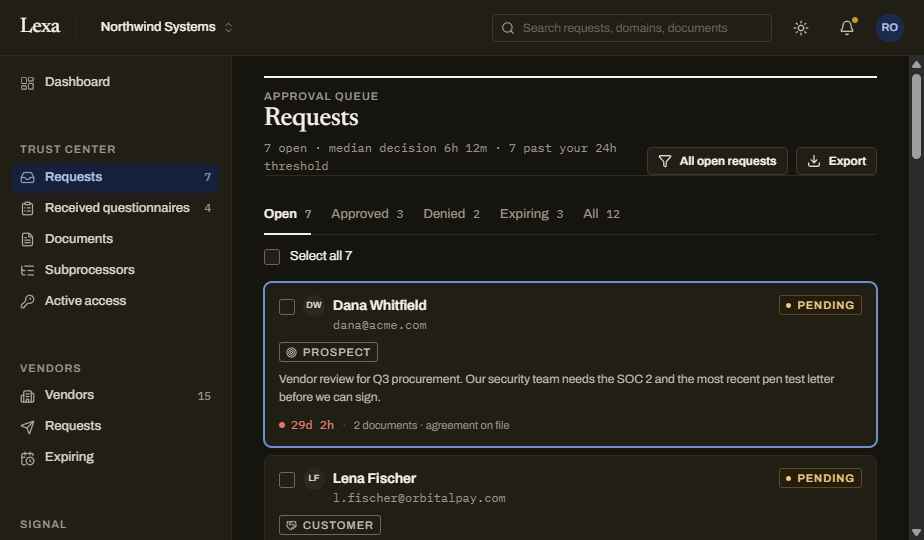
The approval queue

One queue. Every request shows its owner and waiting time.

See the requester's relationship to your company, the documents requested, how long they've waited and whether an agreement is on file. Decide whether to grant access in one place.

northwind.lexa.io/dashboard
Lexa dashboard: the approval queue
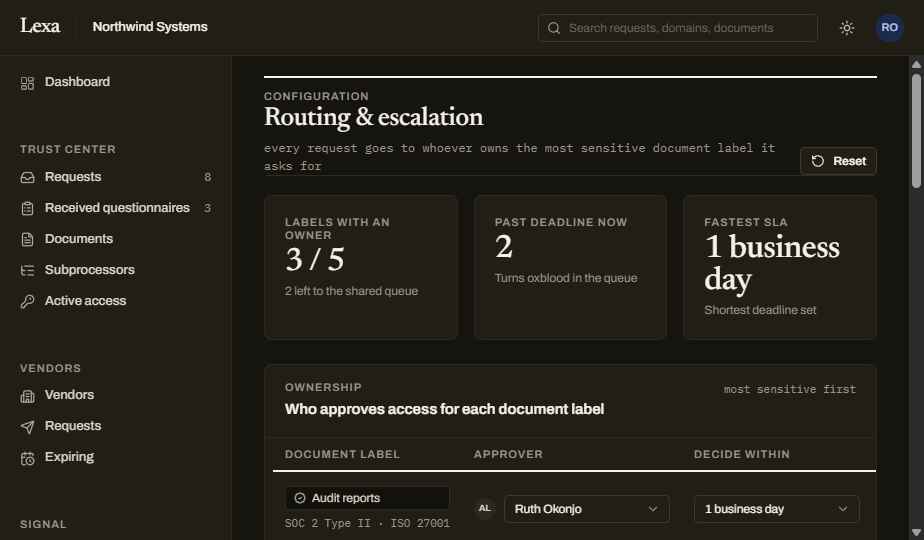
Routing & escalation

The right approver, automatically.

Tag a document with a label on upload; each label has an owner and a decide-by deadline. Requests route to whoever owns the most sensitive document they ask for — and escalate to the account owner if the clock runs out.

northwind.lexa.io/dashboard
Lexa dashboard: routing and escalation
Both directions

Publish your documents. Collect your vendors' documents.

When you're being reviewed
Respond
Publish a trust page with your SOC 2, ISO, pen tests and subprocessors
Share confidential documents with a stamp identifying the recipient of each copy
Route each request to the right approver with its own deadline
Every grant, expiry and download on an audit record
When you're collecting from vendors
Collect
Request documents from the vendors you run on, whether or not they're on Lexa
Track what's outstanding across every vendor in one view
Track document expiry dates. When connected vendors publish renewed documents, the updates reach you automatically.
The same record, pointed the other way
FAQ

What compliance teams ask us first.

Something missing? Ask when you sign up and we'll answer directly.

What is Lexa, in one sentence?+

A security document exchange: you publish your compliance documents once, grant access instead of emailing files, and collect the same documents from the vendors you rely on — with every grant on the record.

Which documents can I publish?+

Anything a security review asks for: SOC 1 and SOC 2 reports, ISO certificates, penetration test summaries, completed security questionnaires, DPAs, subprocessor lists, policies and insurance certificates. If it's a file you keep re-sending, it belongs here.

How is this different from a trust center?+

Lexa combines a published trust page with document requests, access rules and an access record. Requests route to an owner, and renewed reports become available to everyone with active access when you upload them. The same exchange also collects your vendors' documents.

Does Lexa answer security questionnaires for me?+

No. Lexa moves documents between companies; it doesn't fill in forms or write answers. You can publish a questionnaire you've already completed so you never send it twice, but there is no answer library or AI-drafting.

Is this a vendor-risk or GRC tool?+

No. Lexa has no risk scores, tiers, control mapping or assessments, and it isn't trying to replace your GRC platform. It collects your vendors' documents. When a vendor also publishes through Lexa, renewed versions become available through your active access. You decide how to assess and use them.

What does 'stop resending' actually mean?+

You don't have to email the same document again to someone who has active access in Lexa. When you upload a renewed report, they can view the new version there. Documents can also be downloaded as recipient-stamped copies, with downloads recorded in Lexa. A downloaded copy is separate from access to the document in Lexa.

Do my requesters or vendors need a Lexa account?+

No. Requesters view the documents you grant through a link tied to them. Vendors who aren't on Lexa can send documents through an upload portal without creating an account. When a vendor also publishes through Lexa, you get access to the documents they share with you, including renewed versions they publish while your access is active.

Who controls what gets shared?+

You do. Each document has access rules you set: open, request-to-view, NDA required, or approval by a named owner. You can set an expiry or revoke access in Lexa. Downloaded copies carry a stamp identifying the recipient they were issued to.

What if an auditor or customer insists on an actual file?+

They can have one. Where your access rules allow it, someone with active access can download a copy stamped with their name, and the download is recorded in Lexa. Access is the default because it stays current when you upload a renewed report; a downloaded copy is a snapshot of the document at that moment.

What does it cost?+

Early access is free. The first 100 companies on the waitlist lock launch pricing for their first year. We'll publish pricing before general availability; joining the waitlist doesn't commit you to anything.

What happens after I join the waitlist?+

We invite companies in small waves and email you when early access is available to your company. If you'd like to shape the product, mention the design-partner group when you sign up. It's a smaller, hands-on group with a direct line to the team.
Publish your documents. Keep a record of access.

Join the waitlist for early access. We invite companies in small waves and email you when access is available to your company.

First 100 companies
Free through early access. The first 100 companies on the waitlist lock launch pricing for their first year.

Want to shape the product? Ask about the design-partner group when you sign up.

Waitlist
A few details to join the waitlist.
Free through early access. The first 100 companies on the waitlist lock launch pricing for their first year.
Thank you! Your submission has been received!
Oops! Something went wrong while submitting the form.